
“Write with AI” and “Clean up my words”
Under the writing screen there are two AI buttons. They do different things — choosing the right one keeps your own voice in the book.
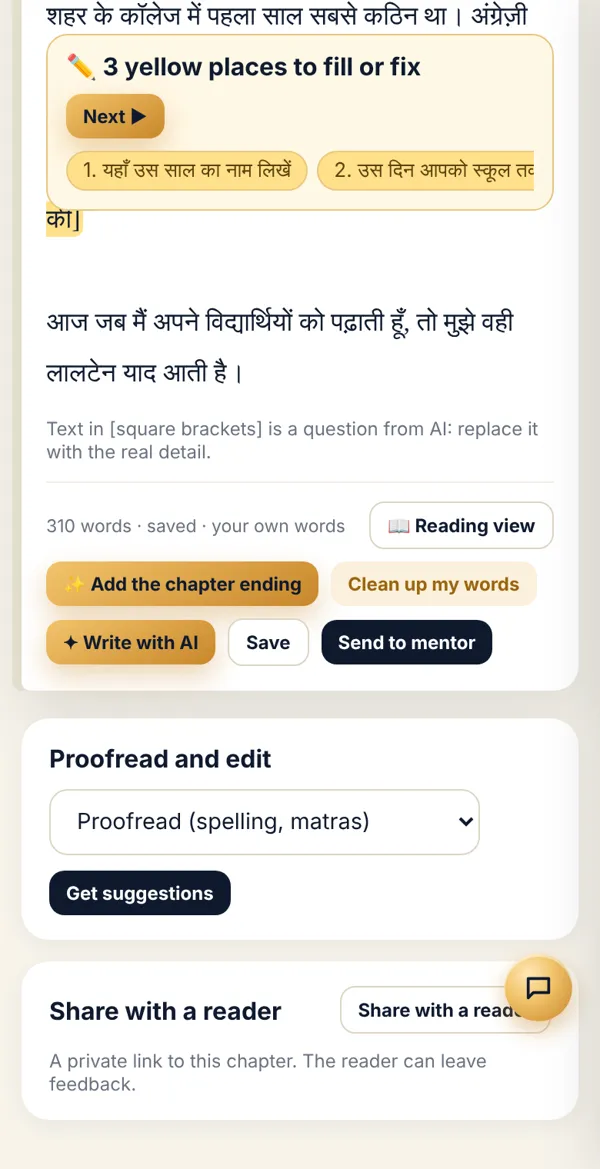
| Button | What it does | When to use it |
|---|---|---|
| ✦ Write with AI | Writes the whole chapter afresh from your stories and the outline, with the ending boxes. | The chapter is empty or has only spoken stories. |
| Clean up my words | Keeps your writing — only fixes spelling, sentences and flow. | You wrote it yourself and want to keep your style. |
-
Tap the button you need. Wait until it finishes (a minute or two).
-
Read the new version. Don’t like it? Pick the previous one from the Version menu at the top — nothing is lost.
-
For small changes, don’t rewrite the whole chapter; ask the Writing partner (💬), e.g. “Make the second part shorter”.
Done? Check it like this
Section titled “Done? Check it like this”The word meter shows the new count and the chapter footer says “saved”.
Stuck?
Section titled “Stuck?”- AI changed my style: Use Clean up my words next time, and take your version back from the Version menu.
- It’s taking long: Long chapters can take 2–3 minutes. Don’t close the page.
Related articles
Section titled “Related articles”Was this guide helpful?
Thank you! This helps us improve the guides.