
Install the app (phone and computer)
Once installed, Book Virasat opens straight from your home screen like any other app — no need to type the address. No Play Store or App Store needed.
-
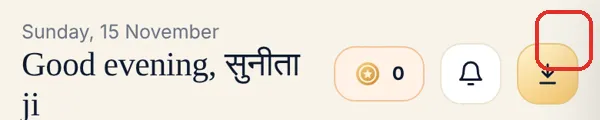
On the app’s home page, tap the ↓ (Install app) button at the top right.
-
On Android and computers the browser asks Install? — tap Install. Done.
-
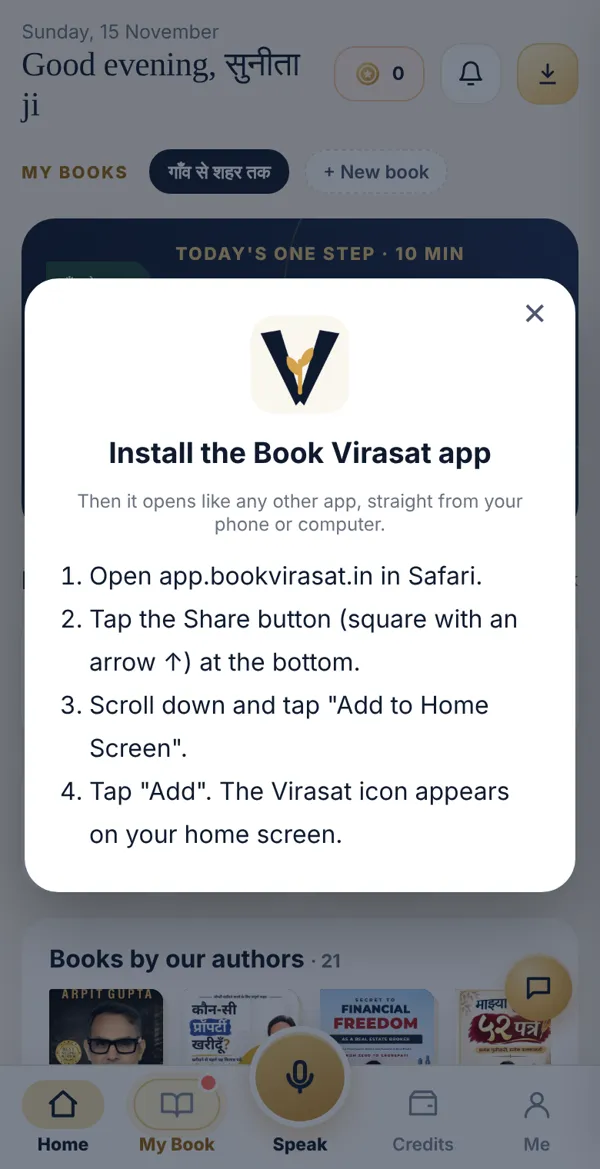
On iPhone, iPad or Mac Safari a small sheet opens with the steps for your device. On iPhone: tap Share (↑) at the bottom → Add to Home Screen → Add.
Done? Check it like this
Section titled “Done? Check it like this”The golden V Virasat icon appears on your home screen (or Dock / Start menu), and tapping it opens the app without the address bar.
Stuck?
Section titled “Stuck?”- No install button: The app is already installed and you’re inside it — the button hides then.
- Using Chrome on iPhone: On iPhone the app installs only from Safari. Open app.bookvirasat.in in Safari.
- Two icons appeared: Press and hold one and remove it. Both are the same app.
Related articles
Section titled “Related articles”Was this guide helpful?
Thank you! This helps us improve the guides.