
Add authors, give credits, set the word limit
The team creates every new author’s account. The rules for their book are set here too.
-
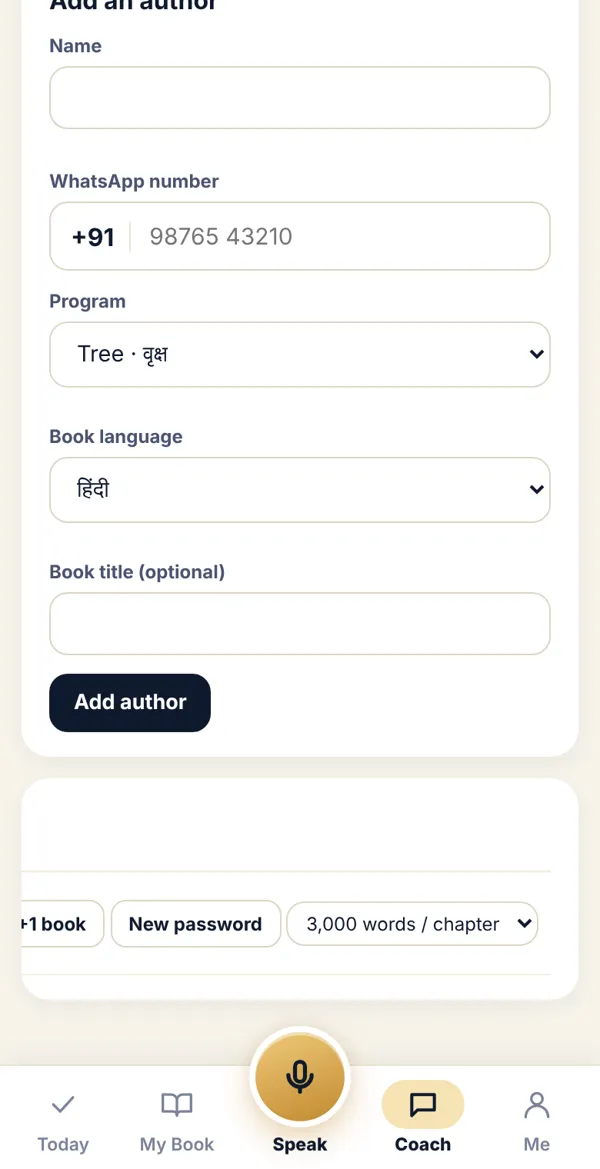
In Coach Desk open Authors. Under Add an author, enter name, WhatsApp number, program, book language and (optionally) the book title. Tap Add author.
-
The app shows a Temporary password. Give it to the author by phone call or in person. They change it the first time they log in.
-
In the list below, each author’s row has buttons: ISBN, +1 book, New password, and the word-limit menu.
-
Word limit: choose 2,000 / 3,000 / 4,000 words / chapter. It saves as soon as you change it. Keep 3,000 for a normal book.
Done? Check it like this
Section titled “Done? Check it like this”The new name appears in the author list, and the author can log in with the first password.
Stuck?
Section titled “Stuck?”- “This number is already registered”: That person is already added. Find them in the list; tap +1 book for a new book.
- An author forgot their password: Tap New password and tell them the new one.
Related articles
Section titled “Related articles”Was this guide helpful?
Thank you! This helps us improve the guides.